

Key takeaways
- A requests call is identifiable from its TLS handshake alone, before a byte of your page or a line of JavaScript runs.
- curl_cffi replays a real browser's TLS and HTTP/2 handshake at the socket level, with no browser process.
- It fits Akamai best, where TLS is checked first, is worth a try on standard Cloudflare, and does little on PerimeterX, where the client-side sensor is the detection.
- It runs no JavaScript. If the data is injected client-side or gated behind a challenge widget, no handshake fixes that.
- Check whether the data is already in the HTML before reaching for a browser. One curl is enough to find out.
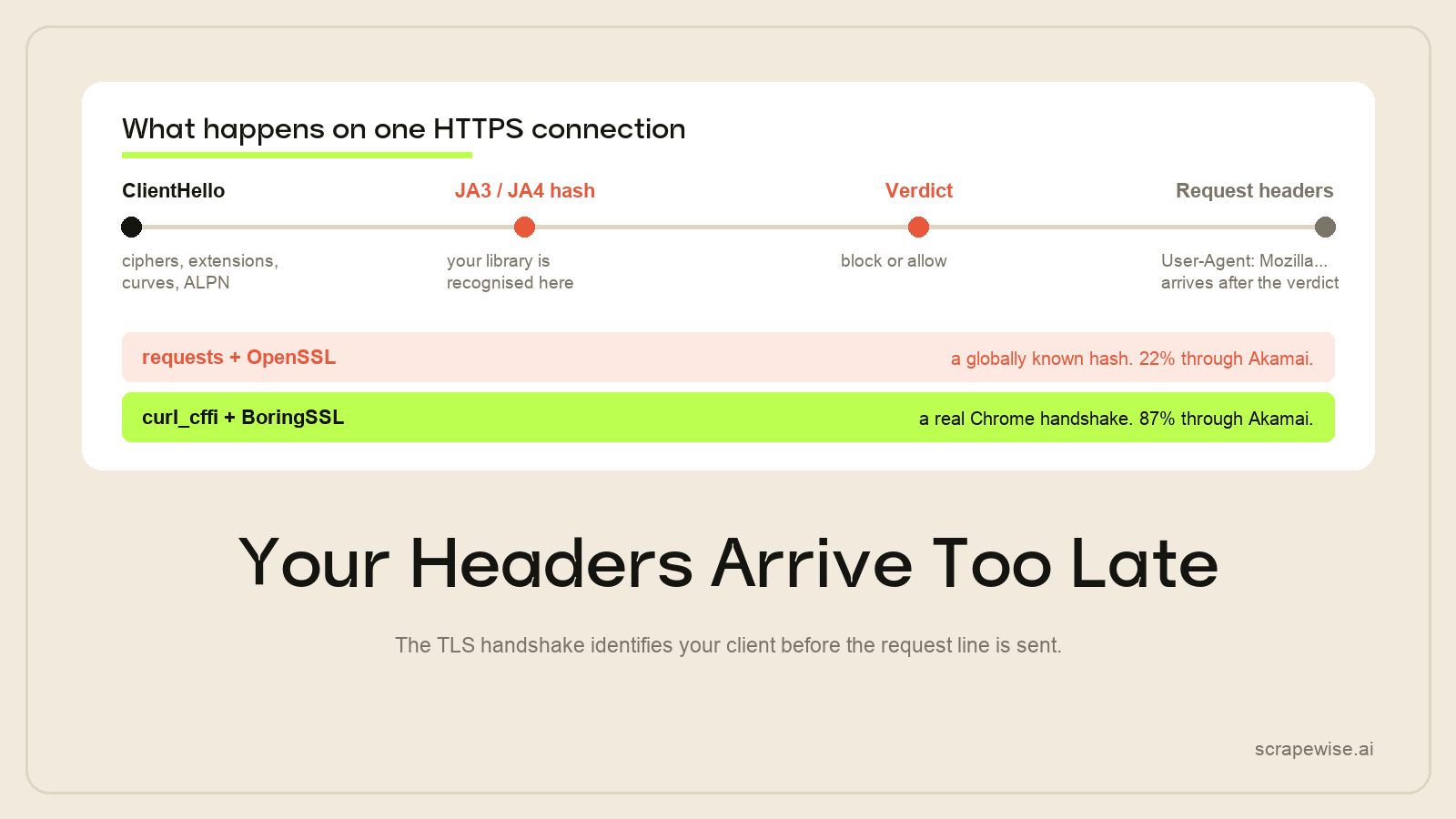
Your scraper is often refused before it sends a single request header. The TLS handshake that opens the connection carries enough detail to identify the library that made it, and a plain Python requests call announces itself there — well before any JavaScript, any user-agent string or any page content comes into play.
curl_cffi fixes that one layer by replaying a real browser's handshake at the socket level. It is not a stealth browser and it does not pretend to be. It is the cheapest large win available on some anti-bot vendors, and almost useless on others, and the difference is worth understanding before you install anything.
Choose Before You Read
| Your situation | Do this |
|---|---|
requests gets 403s and the data is in the HTML |
Use curl_cffi. This is exactly its case. |
| Blocked by Akamai Bot Manager | Try curl_cffi first. It fixes the layer Akamai checks first, and often does better than a stealth browser |
| Blocked by standard Cloudflare | Worth trying. A stealth browser is better if a JavaScript challenge appears. |
| Blocked by PerimeterX | Weak fit. No single setup clears it reliably |
| The page is empty without JavaScript | Wrong tool — use a patched browser |
| You are on Go, Node or .NET | There are equivalents |
| You want the rows, not the stack | Last section |
What a TLS Fingerprint Actually Is
When a client opens an HTTPS connection it sends a ClientHello: the TLS versions it supports, its cipher suites in preference order, its extensions, its elliptic curves, its ALPN protocols. RFC 8446 specifies what may appear; it does not specify the exact set or the order, so every TLS implementation picks differently.
Hash that set and you have a stable identifier for the implementation. That is JA3, and its successor JA4, which is more robust to the cipher-shuffling that defeats JA3.
The consequence is the whole point of this post:
- Chrome has a handshake. Firefox and Safari have different ones.
- Python's
requests— which sits on OpenSSL viaurllib3— has its own, and it looks nothing like a browser's. - That hash is globally known. Anti-bot vendors do not need to detect you; they recognise you.
- It is read before your request line. Your
User-Agent: Mozilla/5.0...header has not been transmitted yet when the decision is available.
This is why "I set a realistic user-agent and it still gets blocked" is the most common confusion in scraping. You dressed the request. The handshake had already introduced you.
Before you change anything, see what you currently look like. tls.browserleaks.com/json returns your JA3 and JA4 hashes as JSON, so a one-line script tells you whether the problem is really the handshake:
import requests
print(requests.get("https://tls.browserleaks.com/json").json()["ja3_hash"])
Run the same call through a browser and compare. If the hashes differ, every header you set afterwards is decoration.
What curl_cffi Does About It
curl-impersonate is a build of curl patched to produce byte-identical handshakes to specific real browser versions. Three things change, and the third is the one most write-ups miss:
- The TLS library is swapped. OpenSSL out, BoringSSL in for Chrome targets and NSS for Firefox targets — the libraries those browsers actually ship. A fingerprint is a property of the implementation, so you cannot fake it convincingly from a different implementation.
- The
ClientHellois reordered. Same cipher suites, same extensions, in the same sequence the real browser emits. - The HTTP/2 fingerprint is matched too. Header table size, initial window size and stream priority are all set to the browser's values. Vendors fingerprint the HTTP/2
SETTINGSframe as well as the TLS handshake, which is why a correct JA3 with default HTTP/2 settings still gets caught on the stricter vendors.
curl_cffi is Python bindings over that build, with an API deliberately shaped like requests. Its README (checked Nov 2026) describes it as a client that "can impersonate browser tls/ja3/http2 fingerprints", lists Chrome, Safari and Firefox presets, and supports HTTP/2 and HTTP/3, which plain requests does not.
pip install curl_cffi
from curl_cffi import requests

r = requests.get("https://example.com", impersonate="chrome")
print(r.status_code, len(r.text))
That is the entire change for a simple call. The impersonate argument selects which browser build to mimic, and it accepts version-pinned targets as well as the floating alias — pin the version if you want reproducible behaviour, since the floating alias moves as the library tracks new browser releases.
A session, which is what you actually want for anything with cookies:
from curl_cffi import requests

proxies = {"https": "http://user:pass@residential-endpoint:port"}

with requests.Session(impersonate="chrome", proxies=proxies) as s:
    s.get("https://example-retailer.de/")          # pick up cookies normally
    r = s.get("https://example-retailer.de/p/12345")
    print(r.status_code)
Your existing requests code — headers, params, json=, timeouts, session cookies — ports across with the import and the one argument.
When a preset is not enough
The preset names cover the common cases. If a target has flagged the exact Chrome build everyone impersonates, you can specify the fingerprint directly instead:
from curl_cffi import requests

r = requests.get(
    "https://example.com",
    ja3="771,4865-4866-4867-49195-49199,0-23-65281-10-11,29-23-24,0",
    akamai="1:65536,2:0,4:6291456,6:262144|15663105|0|m,a,s,p",
)
ja3= sets the TLS fingerprint, akamai= the HTTP/2 one, and extra_fp= covers the remaining signature knobs such as signature algorithms and certificate compression. This is a last resort, not a starting point — a hand-built fingerprint that does not correspond to any real browser is worse than a shared one, because "nothing on earth produces this" is an easier call for a vendor than "one of millions of Chrome users".
Where It Helps, Vendor by Vendor
The handshake fix does the same thing everywhere: it removes the most obvious "this is a script" signal. How much that is worth depends on how much weight each vendor puts on that layer compared with the others.
| Anti-bot system | What it checks first | What curl_cffi changes |
|---|---|---|
| Akamai Bot Manager v4 | TLS and HTTP/2 fingerprint, then a JavaScript sensor | Fixes the first layer and never runs the sensor. Often the best option. |
| Cloudflare (standard) | IP reputation, TLS fingerprint, then JavaScript challenges | Fixes the TLS layer. Fails once a JavaScript challenge appears. |
| Cloudflare Enterprise | Same, plus heavier behavioural scoring and Turnstile | Helps, but a browser is usually needed. |
| PerimeterX / HUMAN | A client-side sensor collecting signals across the session | Fixes TLS only. Sends no sensor data, which is itself suspicious. |
Read it in two directions. Across vendors: the handshake fix is cheap, one keyword argument, and it is the right first step whenever plain requests is refused. Down the list: the ceiling is set by the vendor, not by you. The same code can work well on one vendor and badly on another.
Akamai is the one that surprises people, because a plain HTTP client can get further there than a patched stealth browser. Akamai treats TLS fingerprinting as a primary signal (its own security configuration exposes JA4 fingerprint settings), so fixing layer one fixes much of the problem. Cloudflare weights JavaScript challenges more heavily, which is why a browser catches up there, and it documents how JA3/JA4 fingerprints identify TLS clients. Full cross-vendor comparison: bypassing Cloudflare, Akamai and PerimeterX.
Note also that datacentre proxies cap every row. A perfect handshake from a pre-flagged ASN is still refused at the edge.
The Four Things It Cannot Do
It runs no JavaScript. This is the hard boundary, not a limitation to work around. If the price is written into the DOM by a client-side script, curl_cffi returns the markup without it. Check before you commit: fetch the page and search the raw HTML for a known value. Plenty of large e-commerce sites embed everything in JSON-LD or a hydration payload and need no browser at all — and plenty do the opposite.
It cannot solve a challenge widget. Turnstile, a DataDome interstitial, an Akamai sensor challenge — these need a JavaScript runtime. DataDome in particular makes a browser mandatory.
It does not give you proxies. IP reputation is a separate layer from the handshake, and residential proxies are a separate purchase.
It does not address behavioural scoring. There is no mouse to move, which cuts both ways: nothing to get wrong, and nothing to offer a vendor that scores interaction. Request-timing distribution is the one behavioural signal you still own — randomise across 300–2,500ms rather than sleeping a fixed interval, because a metronome is a fingerprint.
Outside Python
curl_cffi is Python-only, but the technique is not. This matters because the usual advice for a non-Python stack is "use a stealth browser", and on Akamai that is the more expensive and less effective choice.
- Go — uTLS exposes the
ClientHellofor direct construction and has browser presets; tls-client wraps it in a friendlier HTTP interface. - Any language — run the
curl-impersonatebinary and shell out to it, or use its shared library through your FFI. Less elegant, works everywhere. - Node.js — bindings exist but churn; the binary route is the stable one.
There is no Patchright port for Go, Java or .NET, so on those stacks TLS impersonation is often the only socket-level option available to you.
Where This Fits in a Stack
The useful habit is to ask the cheapest question first.
- Is the data in the HTML? One request answers it. If yes, you may never need a browser.
- Does
requestsget blocked? Tryimpersonate=before anything else. It is one argument. - Still blocked? Residential proxies, because the IP is the next thing checked.
- Still blocked, and the page needs JavaScript? Now a patched browser is justified — see the Playwright stealth comparison.
- Challenge widget? A browser plus challenge handling, and a real cost conversation.
Most teams enter at step 4 because that is what the tutorials cover, and carry a 200MB browser process per worker for pages that would have been a 50KB HTTP response.
The Maintenance You Are Signing Up For
Impersonation is a moving target by construction. Browsers change their handshakes; the library has to follow; vendors update what they flag. The curl_cffi README (checked Nov 2026) highlights Chrome 151/152, Safari 27 and Firefox 153 to 155 profiles in its latest release, 0.17.0, which tells you how fast the target moves. Your pinned impersonate="chrome131" is accurate until Chrome 133 is the normal thing to see on the wire, at which point your perfect fingerprint is a conspicuously old one.
Nothing about that cycle appears in pip install, and it is the real cost of a self-hosted fetch layer.
If what you need is competitor prices, stock levels and product data arriving in your systems rather than a fingerprint stack to keep current, this is the wrong question to be answering. ScrapeWise, which publishes this blog, runs the handshakes, the proxies and the browser fallback, and delivers structured rows as a table, CSV or Excel, through the API or over MCP. Each page is tried plain first and moved to a real browser or residential IPs only when it is blocked. It does not get through every site; some block automated visits outright or need a login. No plan and no compute units: a balance you top up, and a published charge per page: EUR 0.15 per 1,000 for plain requests, EUR 0.75 with rendering, EUR 1.50 through the residential tier and EUR 3.75 for render plus residential. To see where your own targets land, run a few of their URLs through ScrapeWise: the first 5 requests are free, no card needed.
You can also call ready-made scraping API endpoints directly, or see how this feeds competitor price tracking.
So Should You Use curl_cffi?
- Yes —
requestsis blocked, the data is in the HTML, and you are on Python. Highest return per line of code in scraping. - Yes — your target is Akamai. It fixes the signal Akamai checks first, for a fraction of a browser's compute.
- Maybe — standard Cloudflare. Try it first; it is cheap to find out.
- No — the page is empty without JavaScript, or there is a challenge widget. Use a patched browser or Camoufox.
- Not the question — you want delivered rows on a daily schedule and would rather not keep a fingerprint current.
Paste a URL that blocks your scraper
ScrapeWise picks the route (plain request, browser or residential proxy) and returns clean data. 5 free requests, no card.
Not ready to sign up? See 12 real Amazon rows, 972 columns →
5 free requests no credit card · from €0.15 per 1,000 pages · or call it from Python or MCP →