

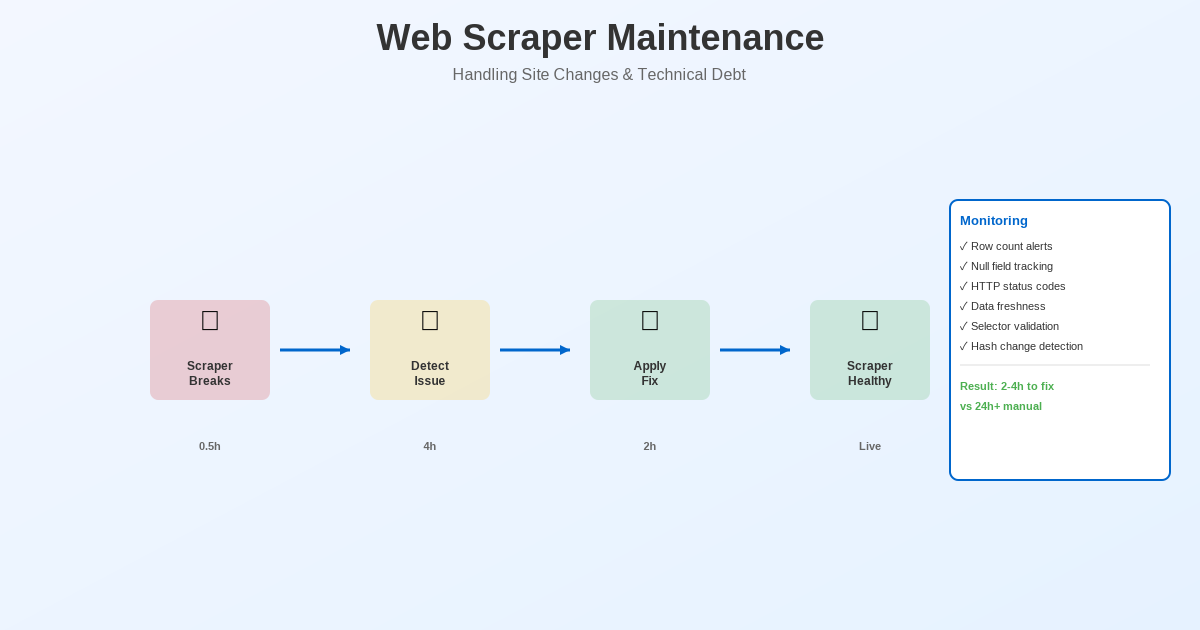
A scraper is not a "set it and forget it" tool. It is a living system that requires feeding.
Every website changes. HTML structure updates. JavaScript frameworks migrate. Anti-bot protections evolve. What works today breaks tomorrow.
The difference between a scraper that runs reliably for years and one that breaks every month is maintenance.
This guide covers the operational side of web scraping: detecting breaks before they become crises, monitoring for site changes, and building a sustainable scraper operation.
Why Scrapers Break: The Top 5 Causes
1. Site Redesigns & DOM Restructuring (30% of breaks)
The most common break. A website restructures their HTML:
- Before:
<div class="product"><span class="price">$25</span></div> - After:
<div class="item"><span class="cost">$25</span></div>
Your selector .product .price returns null. Data stops flowing.
Seasonal risk: Fashion, retail, and seasonal industries redesign quarterly (Spring/Summer, Fall/Winter). These breaks are predictable.
2. JavaScript & Framework Changes (25% of breaks)
A site migrates from jQuery to React. Or from React to Svelte. The page structure remains the same, but data loading mechanism changes:
- Before: Data in HTML on page load
- After: Data loaded asynchronously, requires waiting
Your curl-based scraper, which worked for 2 years, now gets empty pages.
3. Anti-Bot Protection Upgrades (20% of breaks)
Websites upgrade anti-bot tools or detection:
- Added Cloudflare: HTTP 403 Forbidden
- Added bot detection: Extra headers required
- Rate limits tightened: 429 errors start appearing
- IP blocking: Your datacenter IP is blocked
4. API / robots.txt Changes (15% of breaks)
The website updates robots.txt to disallow paths you depend on. Or they move an API endpoint. Or they add a Disallow rule specifically for your scraper patterns.
5. Content Structure Changes (10% of breaks)
Product names moved from <h1> to <h2>. Prices moved from span to data-price attribute. Size options changed from dropdown to radio buttons.
Strategy 1: Automated Monitoring (Detect Breaks in Hours, Not Days)
The goal is to know within 4 hours when a scraper breaks, not 3 days later.
Pattern 1A: Row Count Monitoring
The simplest, most effective monitoring: track the row count of every scraper run.
def monitor_row_count(scraper_name, new_row_count, historical_average):
  """Alert if row count deviates significantly"""

  variance = (new_row_count - historical_average) / historical_average

  if variance < -0.20:  # More than 20% drop
    alert(severity="CRITICAL",
          message=f"{scraper_name}: Row count dropped from {historical_average} to {new_row_count}")

  elif variance < -0.10:  # 10-20% drop
    alert(severity="WARNING",
          message=f"{scraper_name}: Row count at {new_row_count} (usually {historical_average})")

  # Track this run
  log_row_count(scraper_name, new_row_count, datetime.now())
Example:
- Historical average: 1,000 products per run
- Tuesday run: 995 products (0.5% variance) → OK
- Wednesday run: 750 products (-25% variance) → ALERT
- Human inspection: Site redesigned. Selectors need updating.
Pattern 1B: Null/Empty Field Monitoring
Track which fields are returning null more often than usual.
def monitor_field_quality(scraper_name, extracted_data):
  """Alert if field null rate exceeds threshold"""

  field_nulls = {
    'price': sum(1 for item in extracted_data if not item.get('price')),
    'title': sum(1 for item in extracted_data if not item.get('title')),
    'inventory': sum(1 for item in extracted_data if not item.get('inventory')),
  }

  for field, null_count in field_nulls.items():
    null_rate = null_count / len(extracted_data)

    if null_rate > 0.10:  # More than 10% nulls
      alert(severity="CRITICAL",
            message=f"{scraper_name}: {field} is null in {null_rate * 100}% of rows")
Pattern 1C: HTTP Status Code Monitoring
Track HTTP response codes across all scraper runs.
def monitor_http_health(scraper_name, http_codes):
  """Alert on unexpected status codes"""

  expected_codes = {200}  # Usually just 200
  unexpected = [code for code in http_codes if code not in expected_codes]

  if 403 in http_codes:
    alert(severity="CRITICAL", message="403 Forbidden: IP may be blocked")

  if 429 in http_codes:
    alert(severity="CRITICAL", message="429 Rate Limited: Reduce request rate")

  if sum(1 for c in http_codes if c >= 500) > 5:
    alert(severity="WARNING", message="Multiple 500 errors: Site may be down")
Building a Monitoring Dashboard
Track all scrapers in one place:
| Scraper | Last Run | Row Count | Status | Hours Since Update |
|---|---|---|---|---|
| H&M Prices | 2h ago | 2,451 | ✓ OK | 2 |
| ASOS Inventory | 4h ago | 1,245 | ⚠️ LOW | 4 |
| Zara Trends | Failed | - | ❌ DOWN | 24 |
| Amazon Sellers | 1h ago | 5,623 | ✓ OK | 1 |
Alert thresholds:
- 🔴 Critical: No data (> 24h since last run) or 0 rows returned
- 🟠 Warning: 10–20% drop in row count, runs older than 12 hours
- 🟢 OK: Expected row count range, runs within last 6 hours
Strategy 2: Automated Testing (Catch Breaks Before Production)
Before deploying a scraper, verify it works. Test again regularly.
Test Pattern 1: Sample Data Validation
Scrape a known set of URLs. Verify the extracted data is correct.
def test_scraper_accuracy():
  """Test against known products with known data"""

  test_cases = [
    {
      'url': 'https://example.com/product/123',
      'expected_title': 'T-Shirt Blue',
      'expected_price': 25.00,
    },
    {
      'url': 'https://example.com/product/456',
      'expected_title': 'Jeans Black',
      'expected_price': 75.00,
    },
  ]

  for test_case in test_cases:
    result = scrape_product(test_case['url'])

    assert result['title'] == test_case['expected_title'], \
      f"Title mismatch. Got {result['title']}"

    assert result['price'] == test_case['expected_price'], \
      f"Price mismatch. Got {result['price']}"
Run this test:
- After every code change
- Weekly on production data (automated)
- After you detect a site redesign
Test Pattern 2: Selector Stability Test
Verify selectors still find elements.
def test_selectors(page_html, selectors):
  """Verify selectors find expected elements"""

  from bs4 import BeautifulSoup
  soup = BeautifulSoup(page_html, 'html.parser')

  for field, selector in selectors.items():
    elements = soup.select(selector)
    assert len(elements) > 0, f"Selector {field} found no elements"
Test Pattern 3: Regression Testing
After a scraper break is fixed, test that the fix works and does not break other fields.
def test_regression():
  """Before: price scraping broken. After: price scraping fixed."""

  # Setup: Get a product page that caused the original failure
  url = 'https://example.com/product-that-broke-scraper'
  result = scrape_product(url)

  # Test 1: Price is now extracted (the bug that was fixed)
  assert result['price'] is not None, "Price is still null"
  assert result['price'] > 0, "Price is 0 or negative"

  # Test 2: Other fields did not break (regression)
  assert result['title'] is not None, "Title broke when fixing price"
  assert result['inventory'] is not None, "Inventory broke when fixing price"
Strategy 3: Version Control for Scraper Configs
Treat your scraper configurations like code.
# scraper_config_v3.2.yaml
name: "H&M Product Prices"
version: "3.2"
updated: "2026-11-01"

selectors:
  title: "[data-product-title]"  # Changed from .product-name in v3.1
  price: "[data-price]"
  availability: "[data-in-stock]"

# Fallback selectors if primary fails
fallback_selectors:
  title: "h1"
  price: ".cost"

change_log:
  v3.2:
    date: "2026-11-01"
    reason: "Site redesign 2026-11-01"
    changed: "title selector (.product-name → [data-product-title])"

  v3.1:
    date: "2026-09-15"
    reason: "Anti-bot protection upgrade"
    changed: "Added User-Agent rotation, retry logic"

  v3.0:
    date: "2026-08-01"
    reason: "Initial release"
Benefits:
- Rollback to previous config if a change breaks things
- See what changed and when
- Explain why a change was needed
Strategy 4: Change Detection (Know When a Site Changed)
Automatically detect when a website has changed so you can act proactively.
Detection Pattern 1: HTML Hash Monitoring
import hashlib
from datetime import datetime

def detect_site_changes():
  """Detect if site structure changed by comparing HTML hash"""

  url = 'https://example.com/product/123'
  response = requests.get(url)
  current_hash = hashlib.md5(response.text.encode()).hexdigest()

  # Get previous hash
  previous_hash = get_stored_hash(url)

  if current_hash != previous_hash:
    alert(severity="WARNING",
          message=f"Site structure changed for {url}")

    # Store new hash for next comparison
    store_hash(url, current_hash, datetime.now())
Detection Pattern 2: Selector Validation on Each Run
def validate_selectors_on_run(page_html, selectors):
  """Before scraping, verify selectors still work"""

  from bs4 import BeautifulSoup
  soup = BeautifulSoup(page_html, 'html.parser')

  broken_selectors = []

  for field, selector in selectors.items():
    if not soup.select(selector):
      broken_selectors.append(field)

  if broken_selectors:
    alert(severity="CRITICAL",
          message=f"Selectors broken: {broken_selectors}. Site may have redesigned.")
    # Stop scraping and wait for manual fix
    return False

  return True  # Proceed with scraping
The 4-Step Repair Process
When a scraper breaks, follow this process:
Step 1: Identify the Break (30 minutes)
- Review alert: What broke? (row count, specific field, HTTP error?)
- Manual inspection: Visit the site in a browser. Did the layout change?
- Check logs: What error is the scraper reporting?
Step 2: Assess Impact (15 minutes)
- How many scraper runs are affected? (just today, or 3 days?)
- How critical is the data? (pricing: critical. reviews: less critical)
- Is there a workaround? (API, different URL, different field?)
Decision tree:
- Critical impact + no workaround → Escalate to engineer (now)
- Critical impact + workaround exists → Use workaround temporarily
- Non-critical impact → Schedule fix for next sprint
Step 3: Root Cause (1–4 hours)
Use a debugger to understand what broke:
from selenium import webdriver

driver = webdriver.Chrome()
driver.get('https://example.com/product/123')

# Take screenshot of current page
driver.save_screenshot('current_page.png')

# Test each selector individually
elements = driver.find_elements('css selector', '.product-price')
print(f"Found {len(elements)} price elements")

# If 0, the selector is wrong. Find the correct selector.
# Right-click in browser > Inspect > find the price element > copy selector
Step 4: Deploy Fix (1–2 hours)
- Update selector to the new location
- Add fallback selectors (2–3 alternatives)
- Test against 5–10 products (manual spot-check)
- Deploy and monitor for 24h
Real Example: H&M Redesign Incident
Timeline:
| Time | Event |
|---|---|
| 2026-11-01 08:00 | H&M launches new website design |
| 2026-11-01 08:15 | Scraper runs, returns 1,200 products (normal) |
| 2026-11-01 10:00 | New page layout fully rolled out |
| 2026-11-01 12:00 | Scraper runs again, returns 0 products |
| 2026-11-01 12:05 | Monitoring system alerts: "Row count: 0" |
| 2026-11-01 12:30 | Engineer reviews logs, finds selector error |
| 2026-11-01 12:45 | Engineer visits site, inspects new HTML structure |
| 2026-11-01 13:15 | New selectors updated in config |
| 2026-11-01 13:30 | Scraper tested on 10 products, verified correct |
| 2026-11-01 14:00 | Fix deployed, scraper runs, returns 1,200 products |
| 2026-11-01 14:05 | Pricing team confirms data is flowing again |
Total downtime: 2 hours Cost: 1 hour of engineer time If monitoring was not in place: Would have discovered 24h later (missing an entire day of pricing data)
Building a Sustainable Scraping Operation
To run scrapers reliably at scale:
| Component | Purpose | Effort |
|---|---|---|
| Monitoring Dashboard | Know when scrapers break | 16 hours |
| Automated Tests | Catch breaks before production | 12 hours |
| Configuration Management | Track changes, enable rollbacks | 8 hours |
| Change Detection | Proactive alerts about site changes | 12 hours |
| Runbook | Documented repair process | 4 hours |
| Alerting | Slack/Email notifications | 4 hours |
Total setup investment: ~56 hours Time saved per scraper break: 8–16 hours (debugging + fix + testing) Break frequency: 1–2 per scraper per year (depends on site volatility) ROI: Breaks will happen. Detection + monitoring reduce cost 5–10×
Conclusion: Maintenance Is the Unglamorous Secret to Reliable Scraping
The companies with the most reliable scrapers are not using fancy AI or novel techniques. They are using monitoring, testing, and a documented repair process.
Invest in operations. Your future self will thank you.
Ready to set up maintenance systems? Try ScrapeWise's built-in monitoring and alerting — automatic break detection and repair suggestions.
Paste your first URL and get structured data
No code, no credit card. Most public websites, turned into a table you can export.
Not ready to sign up? See 12 rows of real Amazon data →
5 free requests no credit card · pay per page, no monthly plan · book a 15-min call →